

Intrastat LT
Intrastat declarations from SAP data for Lithuanian Customs
Intrastat LT by InnoForce automates the preparation of monthly Intrastat arrivals and dispatches declarations from SAP Cloud ERP or SAP S/4HANA data. It collects sales, purchasing and goods movement documents, applies Intrastat selection rules and checks declaration data against Lithuanian Customs instructions and classifiers.
Users can review declaration lines, correct identified errors and create an XML file for upload to the IDAIS portal in one application. Each line retains references to its SAP source documents, while corrections to submitted declarations are managed as new versions.
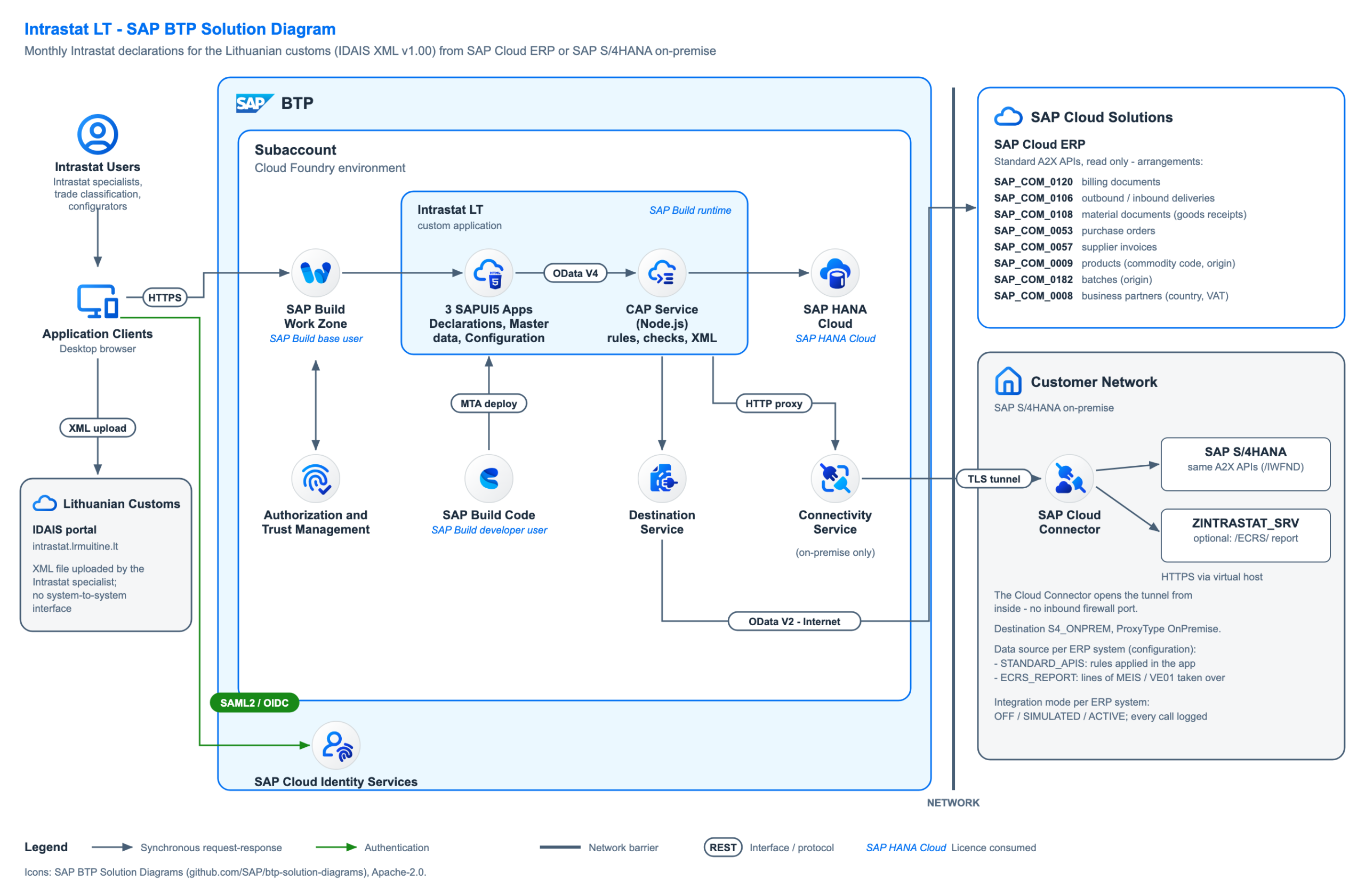
The solution runs as a side-by-side extension on SAP BTP. Its SAP Fiori user interface is available in Lithuanian and English.
Why is Intrastat LT needed?
Preparing Intrastat declarations requires sales, purchasing, goods movement and master data to be brought together. Missing commodity codes, countries of origin or transport details make preparation more difficult and increase the need for repeated corrections.
Intrastat LT collects SAP data, applies configured selection and aggregation rules and shows specific reasons for errors. This reduces manual data transfers and allows checks to be completed before creating the submission file.
Who is the solution for?
The solution is designed for companies that:
- use SAP Cloud ERP or SAP S/4HANA;
- trade goods with other European Union member states;
- are required to submit Intrastat arrivals or dispatches declarations in Lithuania;
- want to automate declaration preparation and retain data traceability.
How does the solution work?
- Select the provider of information, reporting month and flow: arrivals or dispatches.
- Read the required business documents and master data through SAP APIs.
- Apply Intrastat selection rules, calculate reportable values and, where configured, aggregate lines with identical statistical attributes.
- Check mandatory fields and classifier values. Review error reasons and the SAP source documents.
- Correct errors, release the declaration and create the IDAIS XML file.
- Download the file, upload it to the IDAIS portal and record the submission to Customs in the application.
- If a submitted declaration needs correcting, create a new version while retaining the previous one.
Key features
- Generate arrivals and dispatches declarations from SAP documents.
- Process sales, purchasing and goods return scenarios.
- Maintain Intrastat selection and transaction classification rules.
- Aggregate lines with identical statistical attributes while retaining their sources.
- Check commodity CN codes, origin, transport and other mandatory data.
- Convert supplementary quantities using product data.
- Correct data during declaration preparation.
- Create XML files in the 2026 IDAIS format.
- Prepare corrections to submitted declarations as new versions.
- View declaration statuses, versions and the integration log.
- Import Customs classifiers.
- Work in a Lithuanian or English SAP Fiori interface.
For SAP S/4HANA on-premise, the solution can also use lines selected by the standard SAP Intrastat report through an additional OData service.
Key benefits
- Less manual data collection and duplicate entry.
- Faster preparation of monthly declarations.
- Data errors identified before XML file creation.
- Clear links between declaration lines and SAP documents.
- Controlled corrections to submitted declarations.
- One solution for SAP Cloud ERP and SAP S/4HANA environments.
Solution architecture:
For licensing, implementation, or support, contact: info@innoforcegroup.bluejuice.design
Terms and conditions – Our page
Benefits for your business – from data collection to declaration preparation

LESS MANUAL WORK
Prepare declarations from SAP sales, purchasing and goods movement documents, reducing data transfers to separate spreadsheets.
VALIDATION BEFORE SUBMISSION
See missing or invalid data and specific error reasons before releasing the declaration and creating the XML file.
CLEAR DATA TRACEABILITY
Review the SAP source documents behind each declaration line, including lines that aggregate data from multiple documents.
CONTROLLED CORRECTIONS
Prepare corrections as new versions while retaining submitted declarations and their history.
SAP CLOUD AND ON-PREMISE SUPPORT
Use the same declaration preparation, validation and XML creation workflow with SAP Cloud ERP or SAP S/4HANA on-premise.